We didn't build an expense tool that connects to payroll. We built it into payroll.

Share this article

Key Takeaways
You have no problems reimbursing your employees for their expenses. The problem is everything it takes to get there. We've built expense management right into Payworks to take out the chasing, the spreadsheets, and the manual additions to payroll. No separate software, no export file, no one frantically typing totals into payroll before payday. GST/HST and QST fields are captured at the point of entry, on the same form as the rest of the expense detail.
What does expense management solve?
If you run a Canadian small or mid-sized business, you probably recognize this routine. A receipt gets photographed and texted to someone. Mileage is estimated from memory. An approval happens over email or in a group chat. And then someone types the total into the pay run and hopes it matches.
It works, until it doesn't. A receipt goes missing before payday. An employee asks whether their claim has been reimbursed. The person who holds the process together is away. And nobody is capturing the GST, so the credit goes unclaimed.
If this sounds like your business, we built our Expense Management solution for you.
How does expense management work?
The whole process happens inside Payworks, on the same employee record and pay calendar you already use for payroll.
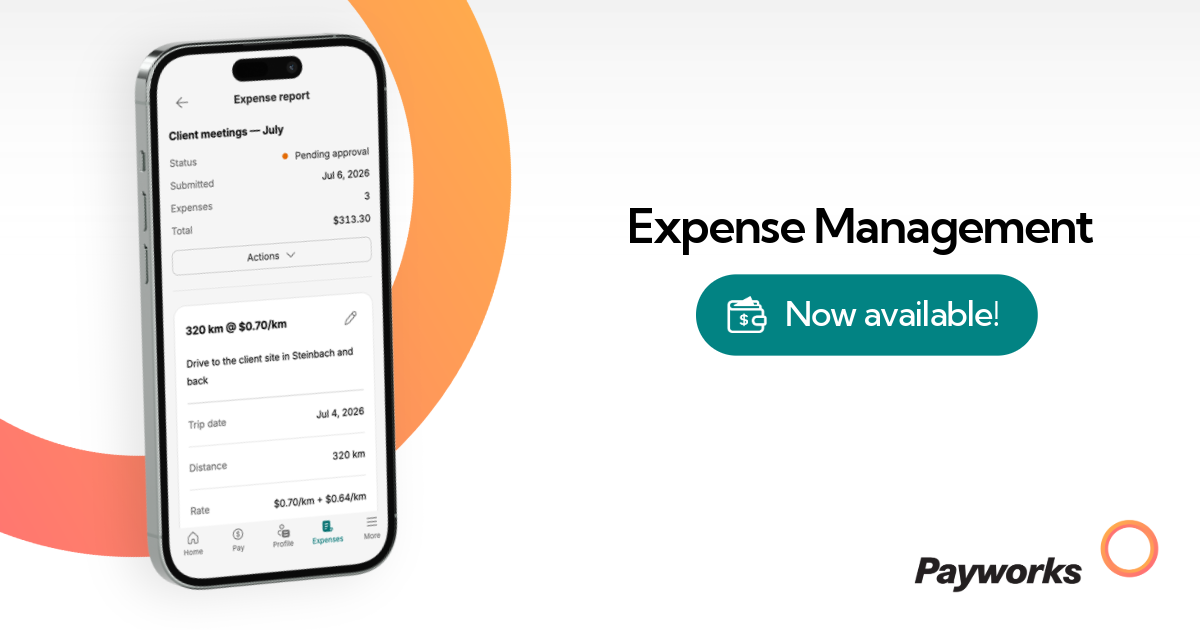
Step 1: The employee captures the expense. They take a photo of the receipt from their phone and the details start filling in: amount, date, and Canadian tax fields. They pick the category and confirm the total. If they drove somewhere for work, they can log the distance, too. And if they need to come back to it later, they can save it as a draft without losing anything.
Step 2: They submit. Expenses are bundled into an expense report for one submission. The manager gets an email notification, no chasing required.
Step 3: The manager approves. One step, with the receipt and details right there. If the claim is denied, the employee sees why so they can fix it and resubmit.
Step 4: It shows up on the next paycheque. Approved expenses are grouped and flow to the next available pay run inside Payworks. The employee knows which pay period it's on. Nobody types anything into payroll by hand.
| Payworks pro tip: If you're a Payworks client, your employees are already in the system, so there's no second employee list to maintain. Our Expense Management solution runs on the same records and pay calendar you already have. |
What makes this different from a standalone expense tool?
There are a lot of expense tools on the market. What makes ours different is where it lives.
A standalone tool sits outside your payroll. Whether it's a spreadsheet, a dedicated app, or a spend management platform, it's a separate system. It keeps its own list of employees, which drifts every time someone is hired or leaves. It has no idea when your pay run is. And it can't confirm that what was approved is what was actually paid, so someone still checks by hand.
Our Expense Management solution is built into Payworks. Your employees are already in the system. Your pay calendar is already there. Approved expenses go straight on to a pay run, and the trail from the receipt to the paycheque is complete. There’s no second system to keep in sync, no export to reconcile, and no manual additions before payday.
We've also built it for Canadian tax. GST/HST and QST fields are right on the expense form. The tax detail is captured when it happens, instead of being pieced together when it’s time to reconcile. For more on ITC eligibility, visit Canada Revenue Agency's GST/HST information for businesses.
Who is expense management built for?
Our Expense Management solution is available to any Canadian business on Payworks. It's especially relevant if you recognize yourself here:
Business owners and office admins.
Right now you're the person who collects receipts, tracks who's owed what, and adds reimbursement amounts to the pay run by hand. When you're away, it stalls. Our Expense Management solution moves the whole workflow into Payworks so your team handles it themselves.
Daycares and childcare centres.
Your staff will often buy supplies, snacks, and craft materials out of pocket, and usually in small amounts. The Director reimburses informally, sometimes from petty cash, sometimes on the next pay. Our solution lets staff submit from their phones, while the Director just approves.
Nonprofits and charities.
Program staff buy supplies, travel to sites, and cover small costs out of pocket. On a lean team the reimbursement usually falls to whoever also runs payroll. The record that results is hard to produce if an auditor or funder ever asks for it. Our Expense Management solution gives staff a convenient way to submit and gives you a clean, dated, approved trail.
Clinics and health practices.
Clinicians travel between locations, pay for continuing-education courses, and buy supplies. The practice manager reimburses these ad hoc, often by adding a line to payroll manually. Distance tracking is a genuine day-to-day need, not an edge case, and our solution captures it as part of the expense.
Multi-location businesses.
Each site has developed its own informal habit: one manager reimburses from petty cash, another collects receipts in an envelope for head office. Nothing rolls up. Our Expense Management solution gives every location the same process, with mobile approval that doesn't require being in the same building.
Accountants and bookkeepers managing payroll for clients.
Your clients' expense handling creates cleanup work your firm inherits. Our Expense Management solution captures the detail at the source, so it's there when you need it. To learn more how it can work specifically for your practice, read this article on theWorks.
How do I get started?
If you're already on Payworks, our Expense Management solution is available as an add-on to your existing platform. There's nothing to migrate, no second implementation, and no new employee setup. It runs on the records and pay calendar you already have.
Contact us directly and we'll show you what it looks like. We've got you covered.
Not on Payworks yet? This is a good time to see what the full platform can do. Payroll, time, HR, absence management, and now expense management — all in one place, all built for Canadian businesses.
Frequently asked questions
Is expense management included in my Payworks subscription?
Our Expense Management solution is a separate module. Pricing details are available from our account executives.
Do my employees need their own Payworks login?
Our Expense Management solution operates within the existing Payworks employee record, using the same Payworks login information that your employees use to check their pay statements and T4s/RL-1s. There’s no separate software or duplicate employee list for you to maintain.
Does it work on a phone?
Yes. Employees can photograph receipts, submit expenses, and track claim status from the Payworks mobile app.
Does it handle mileage and distance?
Yes. Employees record business travel distance as part of the expense, rather than reconstructing it from memory later. For more on CRA automobile allowance rates, visit CRA automobile allowance rates.
Does it connect to my accounting software?
Our Expense Management solution includes journal export, which sends expense data to your accounting system.
Can I set spending limits or an expense policy?
Not in this release. Expense Management covers capture, approval and reimbursement inside Payworks.
Does it work with corporate cards?
No. Our Expense Management solution handles employee-paid expenses and reimbursement; the scenario where someone pays out of pocket and needs the money back on their paycheque.
Employees submit from their phone. A manager approves in one step. It shows up on the next paycheque. That's what we built, and we're here whenever you want to see it.
Get in touch with our team and we'll take it from there.
These articles are produced by Payworks as an information service. They are not intended to substitute professional legal, regulatory, tax, or financial advice. Readers must rely on their own advisors, as applicable, for such advice.